Figure template · Workflow · 4:3
Adaptive Reasoning Paths across Query Difficulty
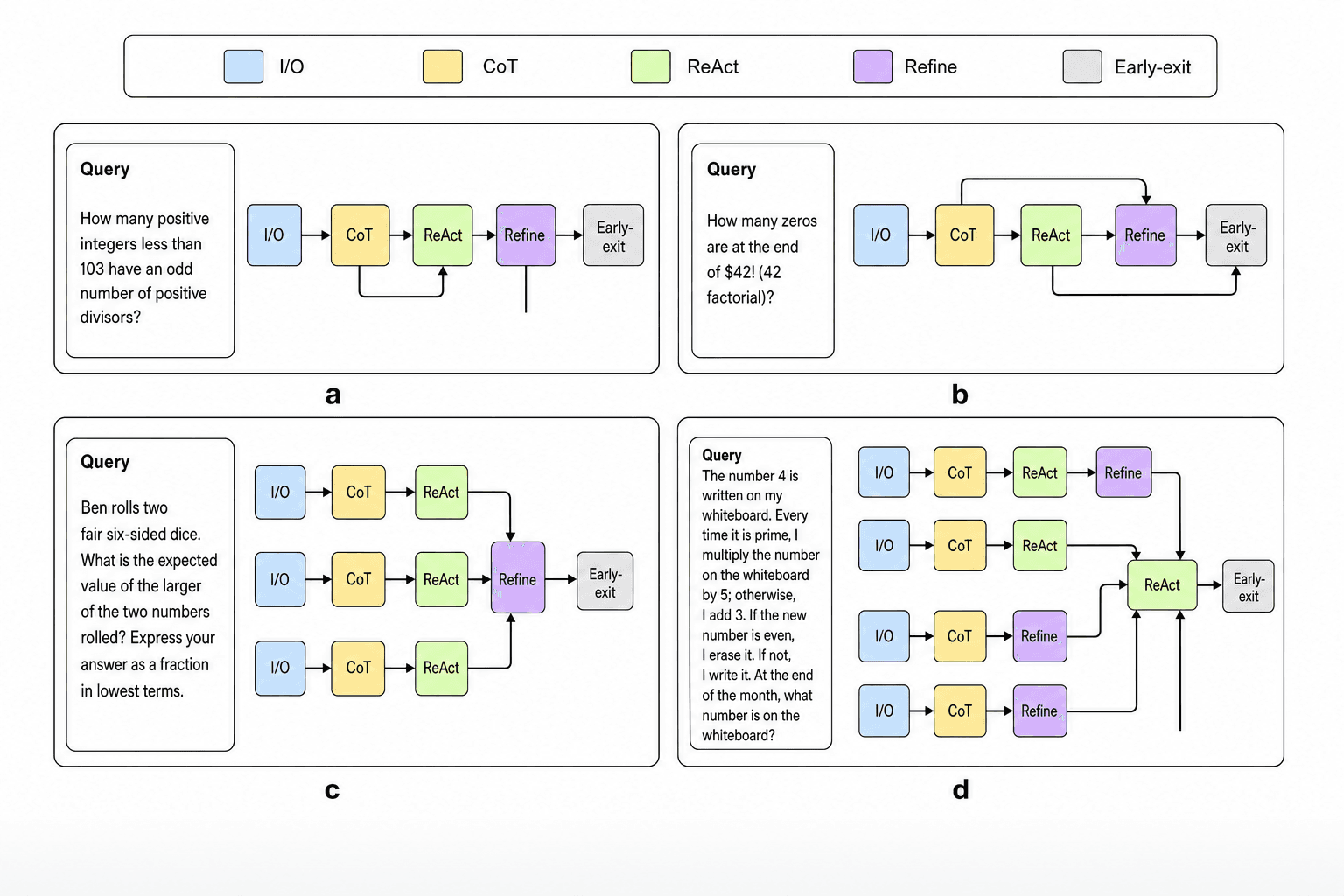
Four panels each pair a math question of rising complexity with a row of colored operator blocks showing the route a model takes for it, from a single chain to merging branches, sized for the methods figure of a language-model reasoning paper.
Prompt
Create a scientific figure about: Adaptive reasoning paths across query difficulty. Visual style: Clean Vector. Requirements: publication-ready scientific quality, clear labels and directional arrows where appropriate, avoid cartoon or stock-photo look, composition optimized for research papers and academic slides.
What this template is
The figure argues that a reasoning framework need not send every question down the same route; it combines operators according to how hard the query is. A legend at the top defines five colored blocks: direct answering, chain-of-thought, interleaved reasoning and acting, self-refinement and early exit. Panels a and b are single chains with a shortcut that skips one operator. Panel c runs three branches in parallel and merges them at a refinement step. Panel d uses four branches with different endings and then aggregates once more. A reader should see that harder queries receive more branches and steps, while easy ones may stop early.
Elements to label
Operator legend
A bar across the top with five colors and names; use the same short names in the text and caption.
Query boxes
A rounded box at the left of each panel with the question itself, kept to about six lines.
Single-chain paths
Blocks in one row in panels a and b, with an elbow line above or below for a skipped step.
Parallel branches
Three identical branches in panel c converging on one refinement block, showing results being merged.
Second aggregation
Four branches with different endings in panel d feed one reasoning-and-acting block before the exit.
Early-exit block
A grey block closing every path; note beside it the confidence condition that triggers the exit.
Panel letters
Letters a to d centered under each panel; if the panels follow difficulty, add the level beside each letter.
Shortcut lines
Elbow connectors that bypass a block in panels a and b; label what condition lets the path skip that operator.
Where it is used
- Paper mechanism figure
- Defense slides
- Academic poster
- Course handout
What reviewers look for
Where difficulty comes from
Nothing in the figure labels difficulty, so readers can only guess from question length. State whether difficulty is a human grade, a model confidence or a router score, and mark the level on every panel.
The easy query runs everything
The simplest question, in panel a, still passes through all five operators and never exits early; to argue for adaptivity, the easiest example should finish after one or two blocks.
Dangling arrows
Panel a has a vertical line below the refinement block that ends nowhere, and panel d has an arrow entering the aggregation block from below with no source; remove or complete both before the figure is used.
Say how branches merge
The figure does not say whether parallel branches are merged by voting, by picking the best or by another model call, nor how much compute each path uses, so the claimed savings of adaptivity cannot be judged.
How to use it in Yila
- 1Pick a figure
- 2Describe your subject and the steps to stress
- 3Refine it in chat, then download the PNG
Tips
Do
- Write a difficulty level into the prompt for each panel, such as easy, medium and hard, so the ordering is visible at a glance.
- Replace the query boxes with real items from your benchmark and proofread every math symbol and factorial.
- Ask for each path's step count or token budget to be written beside its early-exit block, so the cost of each route is visible.
Avoid
- Do not keep the garbled notation in the sample queries; the second question mixes a currency sign into a factorial.
- Avoid paths of similar length in all four panels, or the figure cannot show compute being allocated by difficulty.
Questions
Can this reasoning diagram go straight into a paper?
Treat it as a draft of the methods figure. It is an AI-generated raster image with garbled query text, arrows lacking a source or a target, and no difficulty labels, so correct each of these against your experimental setup before it goes into the manuscript.
Can the blocks in the paths be changed?
Not element by element, but you can keep refining it by chatting in Yila: cut the easiest query down to direct answering and exit, delete the dangling arrows, rename the operators after your own, or reduce the panels to three, then generate a new version.
What format is delivered?
An AI-generated PNG image in 4:3 landscape, arranged two by two. It is not a vector graphic, and the small text in the query boxes is the hardest part to read after reduction, so consider shortening the questions or referring to them by number.
Is it free?
Viewing this page and the sample costs nothing. Generating your own reasoning diagram in Yila consumes credits, and new accounts receive 2,500 credits, enough to rework the operator combinations and the sample questions over several rounds.
My method uses a router. Can that be shown?
Yes. Ask for a router block between each query box and its path that outputs a difficulty score, with arrows of different weights leading to the candidate paths, so the source of each adaptive choice is visible. The router's own cost can be noted beside it as a small label.
Can the four panels become one flowchart?
Ask for a single overview: one query entry at the left, a difficulty judgment that splits into three or four paths with different operator combinations, all joining at the output. It saves space and suits a slide, though individual sample questions are no longer shown and belong in a table instead.