Figure template · Graphical Abstract · 4:3
AlphaFold Protein Structure Prediction Graphical Abstract
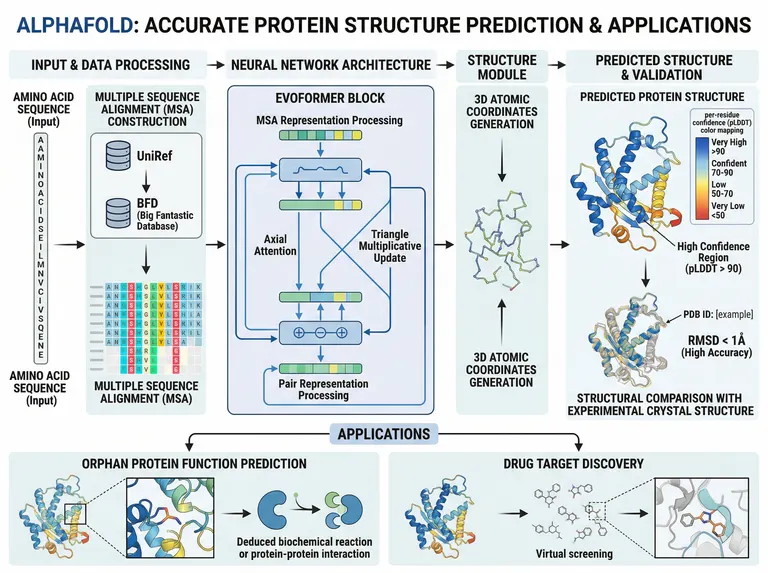
A landscape graphical abstract with four pipeline columns and an applications band below, running from sequence input and multiple sequence alignment through the Evoformer to 3D coordinates and comparison with an experimental structure, for structural and computational biology papers.
Prompt
Create a scientific figure about: AlphaFold graphical abstract from sequence and MSA through Evoformer coordinates and experimental comparison. Visual style: Clean Vector. Requirements: publication-ready scientific quality, clear labels and directional arrows where appropriate, avoid cartoon or stock-photo look, composition optimized for research papers and academic slides.
What this template is
An amino acid sequence is searched against UniRef and BFD to assemble a multiple sequence alignment. Inside the Evoformer, the MSA representation and the pair representation exchange information repeatedly through axial attention and triangle multiplicative updates, which capture co-evolutionary constraints between residues. The structure module turns the result into 3D atomic coordinates, each residue coloured by its pLDDT confidence, and the model is superposed on an experimental crystal structure. Below, two applications follow: inferring the function of an orphan protein and finding drug targets by virtual screening. A reader should grasp how information flows from sequence to structure and how to read the confidence colours.
Elements to label
Sequence input
A vertical sequence strip labelled as input; the sample spells out words in letters, so replace it with an illustrative sequence.
Multiple sequence alignment
Two database icons, UniRef and BFD, feeding a coloured alignment matrix beneath them.
Evoformer block
Two tracks for MSA and pair representations, with axial attention and the triangle multiplicative update named where they act.
Structure module
The middle column producing a backbone trace; the sample repeats the same heading above and below, so remove one.
pLDDT colouring
The model coloured from blue to orange-red by confidence, with a legend in the corner explaining each band.
Experimental comparison
Prediction superposed on a crystal structure with an RMSD label; the sample's PDB identifier is still placeholder text.
Function inference
A zoomed region of the structure with an arrow to the deduced biochemical reaction or protein interaction.
Drug target discovery
A small-molecule library passed through virtual screening, with an inset of a ligand seated in the binding pocket.
Where it is used
- Graphical abstract
- Defense slides
- Course handout
- Grant proposal
What reviewers look for
Confidence is not accuracy
pLDDT is the model's own estimate of local reliability, and low scores often mark disordered regions rather than misfolds. The legend should keep confidence and measured error apart instead of equating high scores with high accuracy.
Comparison numbers need a source
Any RMSD claim must name the residue range compared and the experimental entry used. The sample's identifier is a placeholder, so substitute the real entry before submission or drop the value.
Structure module and recycling
The sample's structure module shows only a repeated heading, with no invariant point attention and no recycling. Readers of a methods paper expect the recycling arrow, or at least a sentence in the legend.
Assumptions behind virtual screening
Predicted models are usually ligand-free, and pocket side chains may not suit docking. If the figure links prediction directly to screening, state whether the pocket was refined or the hits were tested experimentally.
How to use it in Yila
- 1Pick a figure
- 2Describe your subject and the steps to stress
- 3Refine it in chat, then download the PNG
Tips
Do
- Give the protein name and its domain boundaries so the input strip and confidence colouring describe the molecule you actually study.
- For complexes, ask Yila for multi-chain input and a separate colour for each chain in the predicted structure.
- Ask for a recycling arrow from the structure module back to the Evoformer if your audience will ask how the network iterates.
Avoid
- Do not keep the title's claim that predictions are accurate; let the abstract state what was done, not grade it.
- Do not carry the placeholder PDB identifier or comparison value into a submitted figure; use your real entry or remove it.
Questions
Can this AlphaFold abstract go into a submission unchanged?
Treat it as a draft. It is an AI-generated image whose input sequence spells out words, whose structure module heading appears twice and whose experimental comparison still carries a placeholder identifier. Replace those details and keep refining it in chat before you submit.
Can I swap the applications for my own research question?
Not element by element, but you can keep refining it by chatting in Yila. Replace the two applications with, say, mutation effect analysis or antibody design, or keep just one of them, and it will regenerate the band to match your description while leaving the pipeline columns above unchanged.
What format will I receive?
An AI-generated PNG image in a 4:3 landscape frame, suited to graphical abstracts and defense slides. It is not a vector graphic, and the pLDDT legend and alignment letters are small, so check legibility before using it at a larger size.
Is using this template free?
Viewing this page and the sample costs nothing. Generating and editing in Yila consumes credits, and a new account receives 2,500 credits, enough to adapt the protein, databases and applications to your own project over several rounds before you choose the version for your manuscript.
Is the structure in the figure a real prediction?
No. The protein structures and the alignment matrix are illustrations drawn by AI and correspond to no real sequence or prediction output. When your paper needs to show an actual model, render it from your prediction files; this figure explains the workflow only.
Can it show a complex or multi-chain prediction?
Yes. Name the chains in the conversation and it will turn the input column into multi-chain input, colour each chain separately in the structure, and can add a sketch of interface confidence to the validation panel, which is where readers of a complex-prediction paper will look first.