Figure template · System & Network · 4:3
Dual-Stream Encoder with Adapter Blocks and a Decoder Mask
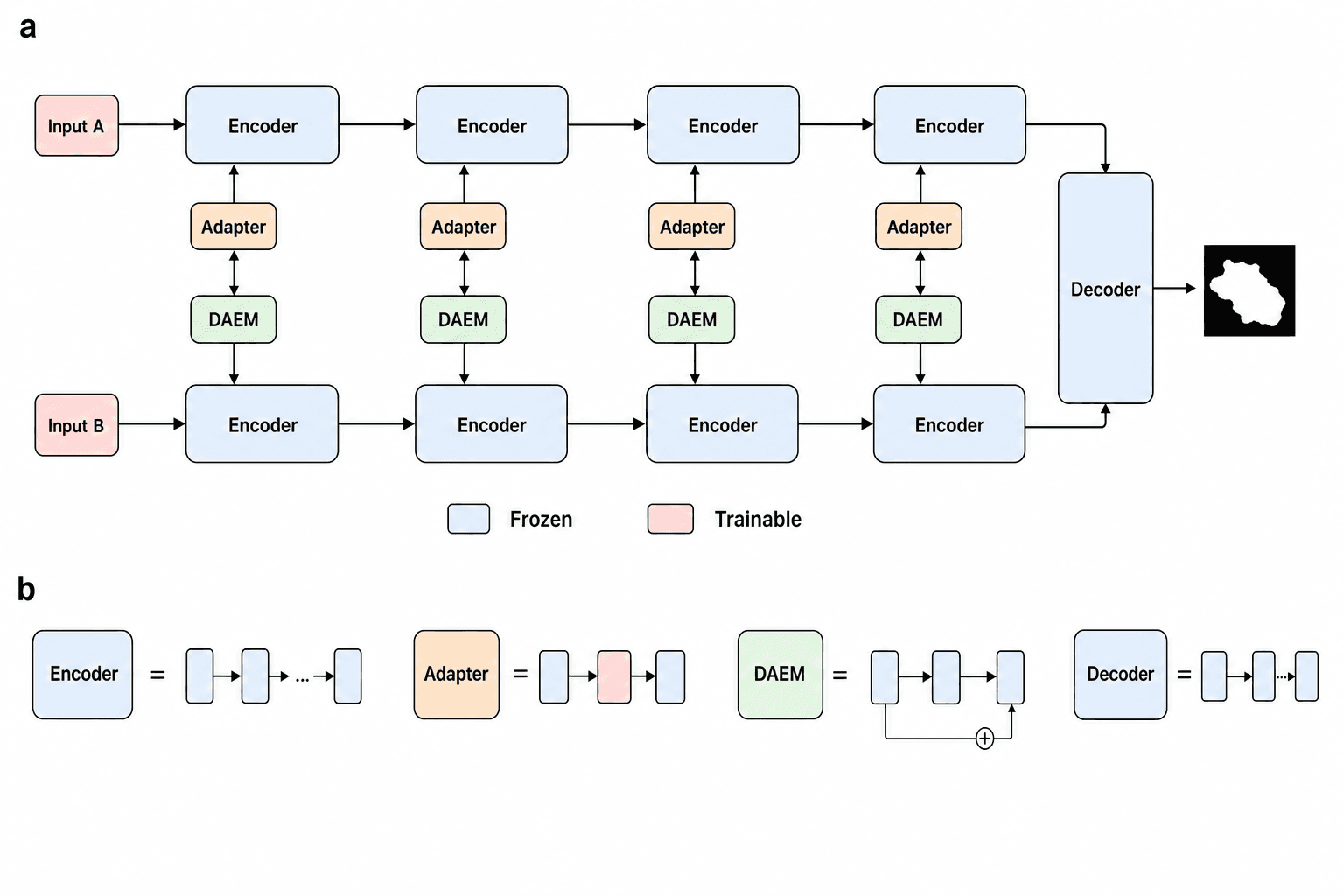
Two parallel encoder pipelines run left to right, with an adapter and a fusion block wedged between them at every stage, converging on a decoder that produces a segmentation mask; a lower panel unpacks each module, for the overview figure of a deep-learning methods section.
Prompt
Create a scientific figure about: Dual-stream encoder with adapter blocks and a decoder mask. Visual style: Clean Vector. Requirements: publication-ready scientific quality, clear labels and directional arrows where appropriate, avoid cartoon or stock-photo look, composition optimized for research papers and academic slides.
What this template is
Panel a gives the data flow. Input A and Input B each pass through a chain of encoder stages marked as frozen. Between the two streams at every stage sit an adapter and a fusion block labelled DAEM, so the two inputs exchange features layer by layer. The last stage of each stream feeds a tall decoder, which outputs a white-on-black binary mask. Panel b uses equals signs to rewrite the encoder, adapter, fusion block and decoder as short sequences of small blocks, including a residual sum inside the fusion block. A reader should come away knowing which parameters are trained and where the two streams meet.
Elements to label
Two inputs
Small boxes for Input A and Input B at the left; in a final figure, name the actual modalities, such as RGB and depth.
Encoder stages
Equal-width boxes in each stream joined by horizontal arrows; note each stage's feature scale inside the box.
Adapter blocks
Orange boxes feeding upward into the first stream; panel b shows only their middle layer as trainable.
DAEM fusion blocks
Green boxes feeding downward into the second stream; spell out the acronym and its role in the caption.
Decoder
A tall box at the right receiving the final output of both streams, with arrows entering from top and bottom.
Binary mask output
A white blob on black standing for the segmentation result; label the prediction task and output resolution beside it.
Frozen and trainable legend
Blue for frozen, pink for trainable; every other color used in the figure belongs in this legend too.
Module breakdown panel
Each module followed by an equals sign and a row of small blocks, with a residual sum drawn under the fusion block.
Where it is used
- Paper mechanism figure
- Defense slides
- Academic poster
- Course handout
What reviewers look for
Colors versus trainability
The legend has two colors, yet the inputs are pink, the adapters and fusion blocks use orange and green outside the legend, and the decoder is marked frozen; reviewers will ask exactly which parameters are trained.
Is the fusion symmetric
Adapters inject only into the upper stream and fusion blocks only into the lower one, joined by a two-way arrow. Say whether this asymmetry is intended, or readers will assume a direction was left out.
No skip connections to the decoder
Segmentation decoders usually draw on several encoder stages, but this figure feeds only the last one; if your model uses multi-scale features, add the connections and mark how each level is upsampled.
Acronyms and stage details
DAEM is never expanded and the stages carry no resolution; the caption should give the module's full name and the channel counts or downsampling factors so others can rebuild the network from the figure.
How to use it in Yila
- 1Pick a figure
- 2Describe your subject and the steps to stress
- 3Refine it in chat, then download the PNG
Tips
Do
- State in the prompt which modules are frozen and which are trained, so the legend matches your actual training setup.
- Replace Input A and Input B with real modality names, so readers know what each stream processes without the text.
- Write each stage's feature-map size or downsampling factor into the prompt, so the hierarchy of the encoder chain is visible at a glance.
Avoid
- Do not let colors appear without explanation; each extra color needs a meaning in the legend.
- Avoid packing layer names and parameters into the small blocks of panel b, which shrink to bare color at print size.
Questions
Can this architecture figure go straight into a paper?
It can serve as a first draft of the overview figure. It is an AI-generated raster image, so check the mapping between colors and trainability, the module acronyms and every arrow direction against your code before deciding to submit it, and fix the legend first.
Can modules in the figure be changed?
Not element by element, but you can keep refining it by chatting in Yila: use three encoder stages, add skip connections to the decoder, replace the fusion block with cross-attention, or expand the legend to four colors, then generate a new version from that description.
What format is delivered?
An AI-generated PNG image in 4:3 landscape with an upper and a lower panel. It is not a vector graphic, and the tiny blocks and ellipses of panel b tend to merge when reduced, so preview it at the real width of a two-column page.
Is it free?
Viewing this page and the sample is free. Generating your own architecture figure in Yila consumes credits, and new accounts receive 2,500 credits, enough to try several module layouts and color schemes before choosing one for the paper.
My model has a single input stream. Can it be adapted?
Yes. Ask for the lower pipeline to be removed, keep an adapter beside each stage as a parameter-efficient fine-tuning plug-in, connect the decoder to the single stream, and leave the module breakdown in panel b as it is.
Can the decoder be drawn in more detail?
Ask in chat for the decoder to be split into upsampling stages with skip connections from the matching encoder stages. The figure grows wider, so consider trimming panel b to expand only the modules you added or changed, and keep the legend in step with any new colors.