Figure template · Graphical Abstract · 4:3
Iterate–Validate Cycle from Hypothesis to Deployment
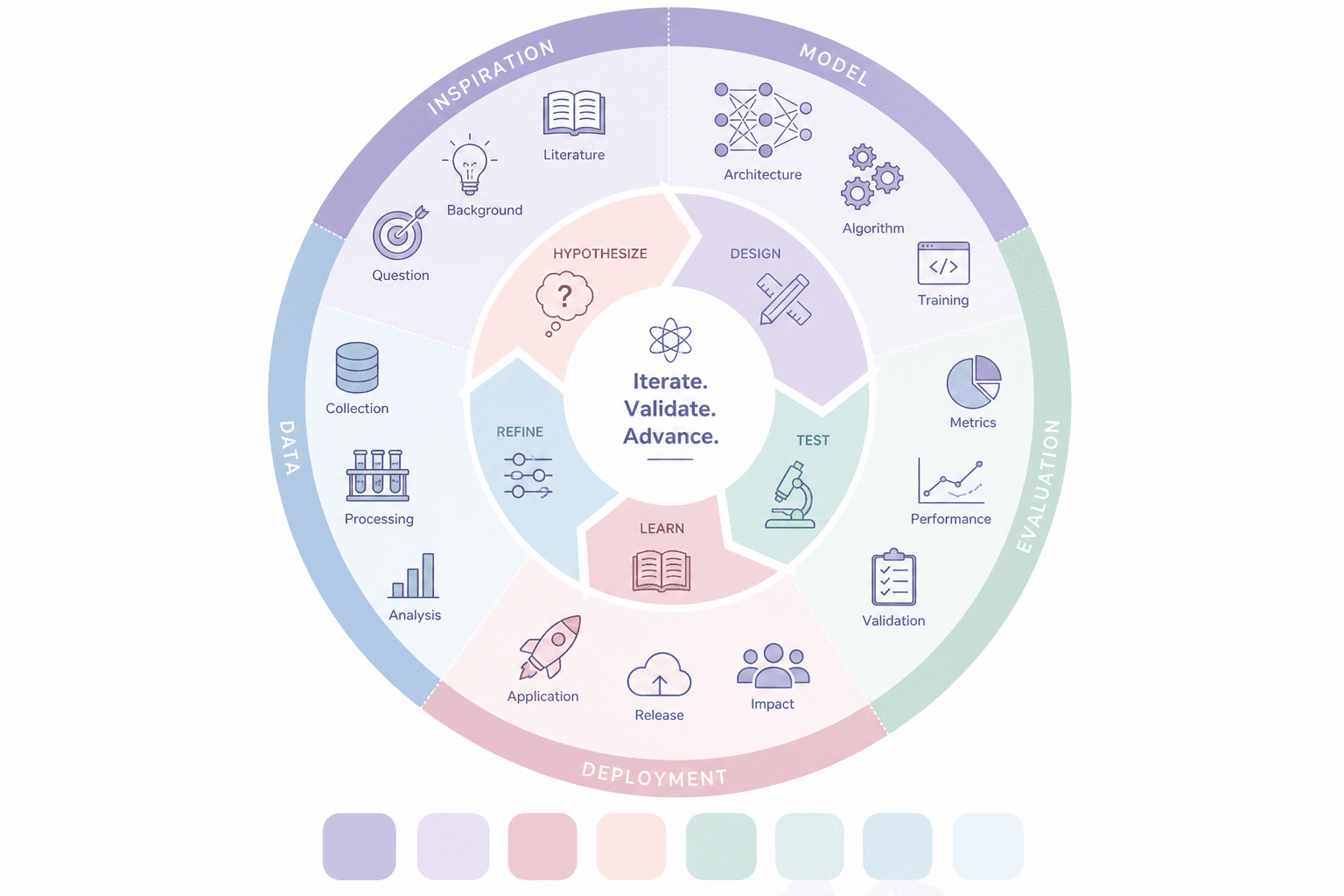
Two concentric rings: an inner loop of joined arrows for hypothesize, design, test, learn and refine, and an outer ring of five sectors that ground those moves in data, models, evaluation and deployment, suited to a graphical abstract or a research-framework page.
Prompt
Create a scientific figure about: Iterate–validate cycle from hypothesis to deployment. Visual style: Clean Vector. Requirements: publication-ready scientific quality, clear labels and directional arrows where appropriate, avoid cartoon or stock-photo look, composition optimized for research papers and academic slides.
What this template is
The figure argues that research advances by going round, not in a straight line. The inner ring is the methodological loop: five colored arrows meet head to tail, clockwise, around a center that reads iterate, validate, advance. The outer ring is the practical layer, starting from inspiration and literature, moving through model building, evaluation and deployment, and returning through data collection and analysis. A reader should leave knowing which actions make up one iteration and what each action produces, and should see that deployment is reached by repeated passes rather than a single attempt.
Elements to label
Center motto
An atom icon above three short words; replace them with your project's core claim in no more than three lines.
Hypothesize arrow
The start of the inner loop, with a question-mark bubble and an all-caps label sized like the other four.
Design and test arrows
A ruler and pencil for design, a microscope for test, each colored to echo its matching outer sector.
Learn and refine arrows
These close the loop back to the start; refine uses slider icons to suggest tuning parameters or plans.
Five outer sectors
Inspiration, model, evaluation, deployment and data each take one curved color band, with the name set along the arc.
Sector icons
Three line icons with noun labels per sector, such as literature, algorithm or metrics, all at one stroke width.
Deployment sector
Application, release and impact along the bottom arc, the endpoint that the hypothesis-to-deployment framing points to.
Swatch strip
Eight unlabeled color squares below the ring are palette leftovers; delete them or turn them into a labeled legend.
Where it is used
- Graphical abstract
- Grant proposal
- Defense slides
- Course handout
- Lab website
What reviewers look for
How the two rings line up
The five inner actions and the five outer sectors do not correspond one to one; learn, for example, sits opposite deployment. Align them by position, or say in the caption that the outer ring is a separate layer of outputs.
Where data sits
Read clockwise, data collection comes after deployment and before inspiration, which suggests data are gathered only after release; if your data precede modeling, move the data sector ahead of the model sector.
Where validation happens
The title stresses validation, yet the inner ring only says test and the validation icon is tucked into the evaluation sector. State whether validation uses held-out data, an external cohort or field deployment, and mark that spot.
When the loop stops
A closed inner ring has no exit, so readers cannot tell what ends an iteration and releases the result to deployment; a decision node between refine and deployment can state the stopping criterion you actually apply.
How to use it in Yila
- 1Pick a figure
- 2Describe your subject and the steps to stress
- 3Refine it in chat, then download the PNG
Tips
Do
- Rename the five inner actions to the stages your project really uses; the count can change, though about five keeps the ring readable.
- Match each inner arrow's color to its outer sector, so readers can link the two layers by color alone.
- Write your stopping criterion into the prompt, so the figure can show where an iteration ends and deployment begins.
Avoid
- Do not keep the strip of unlabeled swatches under the ring; in a graphical abstract it reads as a missing legend.
- Avoid sentence-length labels on the fifteen outer icons, since only one or two words survive at thumbnail size.
Questions
Can this cycle go straight into a paper?
It works best as a draft of a graphical abstract or framework figure. It is an AI-generated raster image with generic stage names and icons, so replace them with the specific steps of your study, delete the unlabeled swatches and proofread every word before submission.
Can elements on the ring be changed?
Not element by element, but you can keep refining it by chatting in Yila: cut the inner loop to four arrows, swap an outer sector for ethics review, move data ahead of the model, or drop the outer ring entirely, then generate a new version with those changes applied.
What format is delivered?
An AI-generated PNG image in 4:3 landscape, with the ring centered and white space at the sides. It is not a vector graphic, and the arc-set sector names are the first text to blur when reduced, so check them at the size of the abstract thumbnail.
Is it free?
Browsing the page and viewing the sample cost nothing. Generating a version for your own study in Yila consumes credits, and new accounts receive 2,500 credits, which covers several rounds of renaming stages and adjusting the palette until the ring tells your story.
My work is clinical, not machine learning. Does it still fit?
Yes. Hypothesize, design, test, learn and refine are general. Replace the model sector with protocol design and swap icons such as training and algorithm for enrollment, follow-up and statistical analysis, and the ring follows a clinical trial instead.
Can it become a portrait layout for a poster?
Ask for a portrait composition with the ring at the top and a block below for three or four key points. The circle itself tolerates a change of proportion well, but the outer-ring text should be trimmed so it does not crowd the arcs, and the motto at the center may need to shrink to a single line.