
How to Quickly Format a Submission-Ready Paper with Yila
A practical guide to formatting a submission-ready paper with Yila, from manuscript upload and template selection to final PDF and LaTeX source review.
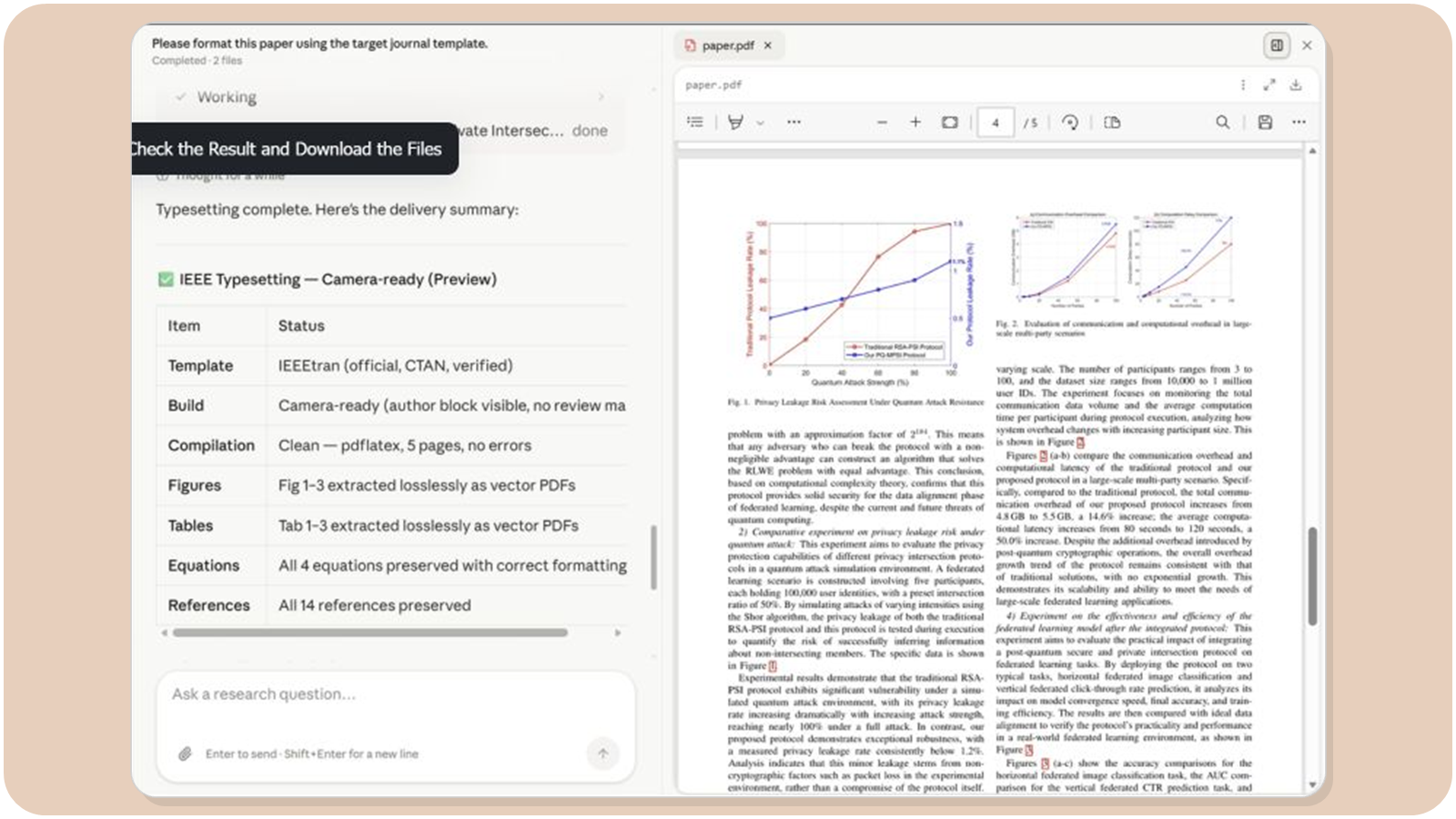
Formatting is often the last obstacle between a finished manuscript and a real submission. Authors may still need to apply a journal template, switch to a two-column layout, fix drifting figures, standardize references, or resolve LaTeX compilation errors. These tasks do not improve the research itself, but they can consume a great deal of time.
Yila Paper Formatting can read Word, PDF, or LaTeX manuscripts, rebuild them in the target journal or conference template, and deliver both a formatted PDF and a complete LaTeX source project. You do not need to master complex LaTeX workflows first. Prepare the manuscript and tell Yila where you plan to submit it.
This guide explains the workflow in three steps. Details about template differences, figures, equations, anonymous submission, page limits, and later revisions are covered in the FAQ.
Quick Start in 3 Minutes
Step 1: Upload the Manuscript and Choose a Target Template
Open Paper Formatting and upload the manuscript that needs to be reformatted. Common input formats include:
- Word manuscripts
- PDF manuscripts
- LaTeX projects
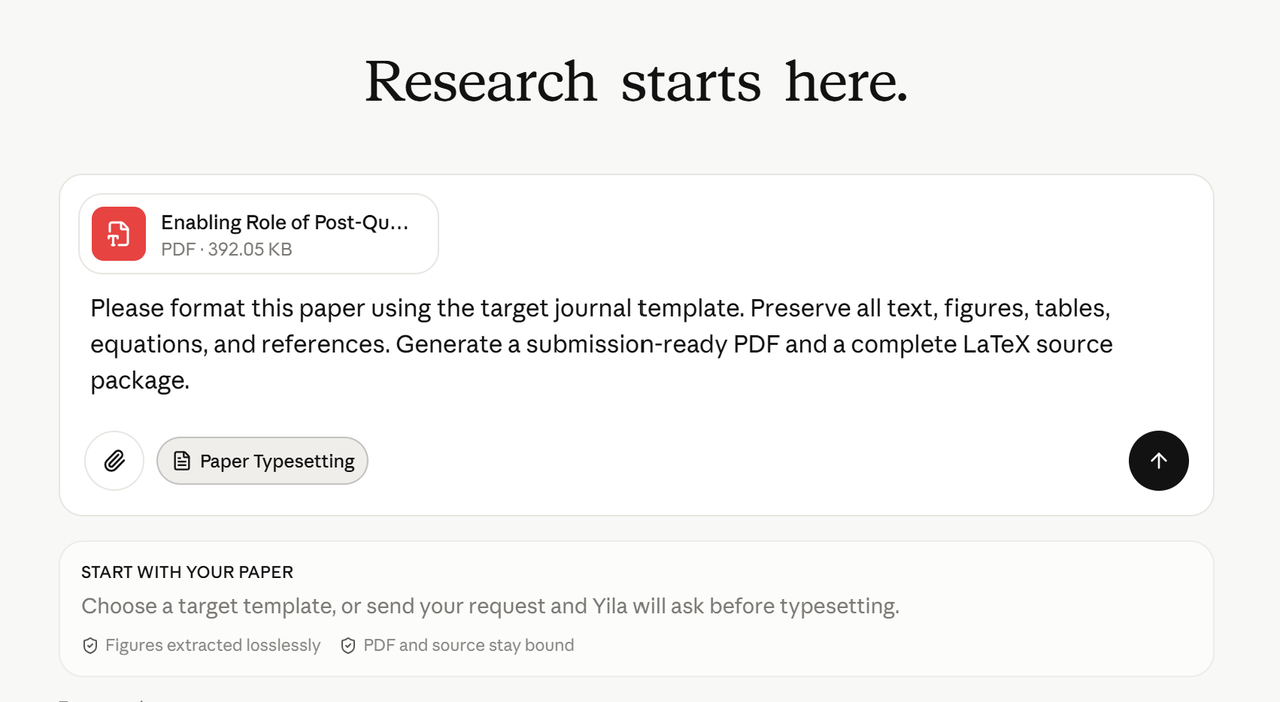
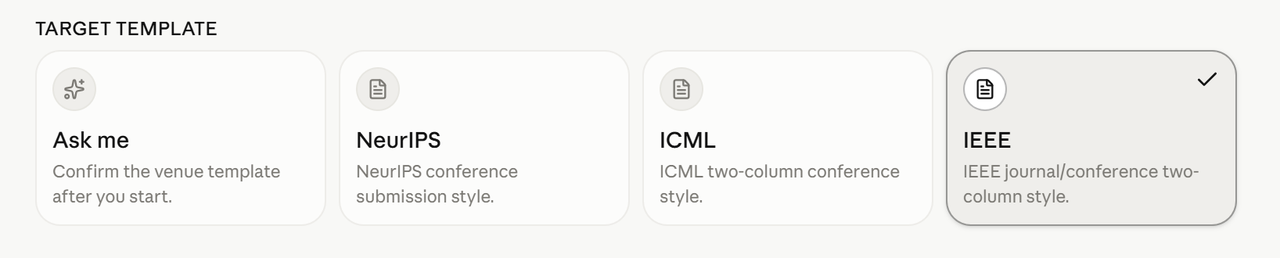
Then choose the target template. Yila provides common options such as NeurIPS, ICML, AAAI, IEEE, ACM, Springer, and Elsevier, and it also supports custom requirements.
If you have not selected a journal yet, or you are unsure which template to use, choose Let Yila Ask Me. Yila will confirm the target format before formatting begins, so you do not need to research every template parameter in advance.
Step 2: Add Formatting Requirements and Start
In most cases, you can begin immediately after selecting the template. Add a short note only when you have special requirements, such as:
- Submission or camera-ready version
- Anonymous or non-anonymous submission
- Single-column or double-column layout
- Page limit
- Output language
- Custom template or style files
For example:
Reformat the manuscript according to the NeurIPS anonymous-submission template. Keep the main text within 9 pages, handle the appendix and references according to the template, and preserve all figures, tables, equations, and cross-references.
If there are no special requirements, you do not need to fill in every item. Provide the manuscript and target template, then start the task.
Step 3: Check the Result and Download the Files
After formatting is complete, review the result and download two core deliverables:
- paper.pdf: the formatted paper PDF for checking, sharing, or submission.
- source.zip: the complete reproducible LaTeX project, including source files, referenced images, and other resources that can be edited locally or in Overleaf.
If you find a problem, describe the location directly. For example: "Figure 3 is too small. Increase its width without changing the main text or caption." Or: "Hide the author information and convert this to an anonymous-submission version."
How to Write More Accurate Formatting Requirements
The most useful format is: manuscript format + target journal or conference + submission stage + special constraints. You do not need to describe every font and margin; details already specified by the template can be handled by Yila.
1. Convert a Word Paper to a Conference Template
Convert my uploaded Word paper to the ICML double-column submission template. Preserve all equations, figures, tables, captions, and references, and generate a formatted PDF and complete LaTeX source.
2. Rebuild a PDF as Editable LaTeX
Rebuild this PDF paper as a compilable IEEE LaTeX project. Keep the section order, figures, tables, equations, and citation sequence consistent, and output both paper.pdf and source.zip.
3. Change the Target Journal or Conference
Reformat the current ACM-template paper using the Springer template. Do not rewrite the main text. Update the section formatting, figure placement, citations, and reference style.
4. Anonymous Submission and Page Limits
Format the paper for a NeurIPS anonymous submission. Hide author, affiliation, and acknowledgement details, and keep the main text within 9 pages. Do not remove research results; report any remaining overflow.
5. Custom Template
Use the official LaTeX template and style files I uploaded. Preserve the template structure, ensure the project compiles completely, and include every referenced resource in the source package.
Core Advantages of Yila Paper Formatting
- Works from the complete manuscript, not just its appearance: Yila reads the document structure and rebuilds sections, figures, equations, citations, and references.
- Supports several input formats: Word, PDF, and LaTeX can all be used as the starting point.
- Designed for real submission templates: Use common journal and conference templates or provide a custom template and formatting instructions.
- Delivers both PDF and source: Receive a readable formatted PDF and a complete compilable LaTeX project for later revisions.
- Keeps figure resources with the project: Images referenced by the source are included in the source package, reducing missing-file problems.
- Requires only simple instructions: When you do not know the exact parameters, choose Let Yila Ask Me and confirm only the target venue and key constraints.
Frequently Asked Questions and Additional Notes
1. Will formatting change my paper's content?
Paper formatting focuses on the template, layout, and file project. It is not the same as language polishing or content rewriting. Yila may adjust line breaks, page breaks, figure placement, section commands, and citation structure to fit the template, but it should not change the research conclusions. If you want the wording preserved exactly, state: "Do not rewrite the main text."
2. Which is best to upload: Word, PDF, or LaTeX?
If you have the complete LaTeX source, upload it with all dependencies. If only a Word manuscript is available, upload Word. A PDF can also be rebuilt, but because it is a fixed-layout format, equations, tables, and citation relationships may require more checking. In every case, provide clear original images when possible.
3. What if I have not chosen a journal?
Choose Let Yila Ask Me, upload the manuscript, and describe the research field or candidate venues. Final formatting still requires a target template because journals and conferences can differ substantially in page area, columns, citation rules, anonymity requirements, and page limits.
4. Which templates are supported?
The interface provides common options including NeurIPS, ICML, AAAI, IEEE, ACM, Springer, and Elsevier. For other venues, choose a custom template and provide the official template, style files, or author guidelines. Final compatibility depends on the supplied template files and task result.
5. Can I use a custom template from a journal website?
Yes. Upload the template archive, class or style files, and any necessary instructions. Identify the main template file and the submission stage. A compilable official template is more useful than screenshots of the journal website.
6. How are figures, tables, and equations handled?
Yila aims to preserve figures, captions, numbering, equations, and references from the main text, and to include the required resources in the LaTeX project. Before submission, check image resolution, column spanning, table width, symbols, and numbering, especially when rebuilding from PDF.
7. Will references automatically use the target style?
Formatting applies the target template's citation and bibliography presentation. However, changing the style cannot fix incorrect author names, titles, years, DOIs, or citation relationships in the original manuscript. Confirm that every in-text citation maps to the correct bibliography entry.
8. Can anonymous submissions be handled?
Yes. State that the task is for an anonymous submission and specify whether author names, affiliations, email addresses, acknowledgements, grant numbers, or identifying details in supplementary files should be hidden. Review every page afterward because images, filenames, PDF metadata, and self-citations can also reveal identity.
9. Will Yila automatically delete content to meet a page limit?
Yila should not delete important content by default. Ask it to first use template-compliant figure placement, float positioning, and legal layout adjustments. If the paper remains too long, the author should decide what to shorten or move to an appendix. Avoid forcing the paper to fit with prohibited tiny fonts or abnormal margins.
10. What is usually inside source.zip?
The archive contains a complete LaTeX project, typically including the main .tex file, template or style files, bibliography files, and referenced images. The exact directory structure varies by template. The key requirement is that referenced files are included and the project can compile.
11. Can source.zip be edited in Overleaf?
Yes. Upload the archive to Overleaf or open it in a local LaTeX environment. Confirm the main file, compiler, and template requirements, then compile the project once before continuing to edit the text, author details, figures, or references.
12. Why download the source if the PDF looks fine?
Submissions often require later changes to author information, figures, review responses, or even the target template. A PDF alone is difficult to maintain. The complete source project makes future editing, reproduction, and recompilation much more reliable.
13. What should I check after formatting?
Review five areas: content completeness, numbering, citation links, layout compliance, and successful compilation. Pay special attention to the first page, section order, figures, equations, cross-references, bibliography, anonymous information, page limits, and supplementary material. The venue's latest author guidelines remain the final authority.
14. How long does formatting take?
Timing depends on manuscript length, input format, the number of figures and equations, template complexity, and compilation problems. A standard task may take tens of minutes, while complex PDF reconstruction, custom templates, or missing resources can take longer. Follow the progress shown on the task page.
15. What is the difference between paper formatting and language polishing?
Paper formatting addresses templates, layout, figures, equations, citations, and a compilable project. Language polishing improves wording, clarity, and academic flow. If both are needed, finalize the content first and format afterward so large rewrites do not disrupt the completed layout.
Summary
Formatting a paper with Yila has three steps: upload the manuscript, choose the target template and add any special requirements, then review the result and download the PDF and LaTeX source.
For a first task, you do not need to study every detail of the journal template in advance. Prepare the Word, PDF, or LaTeX manuscript and tell Yila where you plan to submit, whether anonymity is required, and whether there is a page limit. The remaining formatting work can be completed step by step in the task.