
How to Quickly Create a Professional Research Presentation with Yila
A practical guide to creating a professional research presentation with Yila, from uploading source materials and choosing presentation settings to outline approval, quality review, revision, and final PPTX or PDF export.
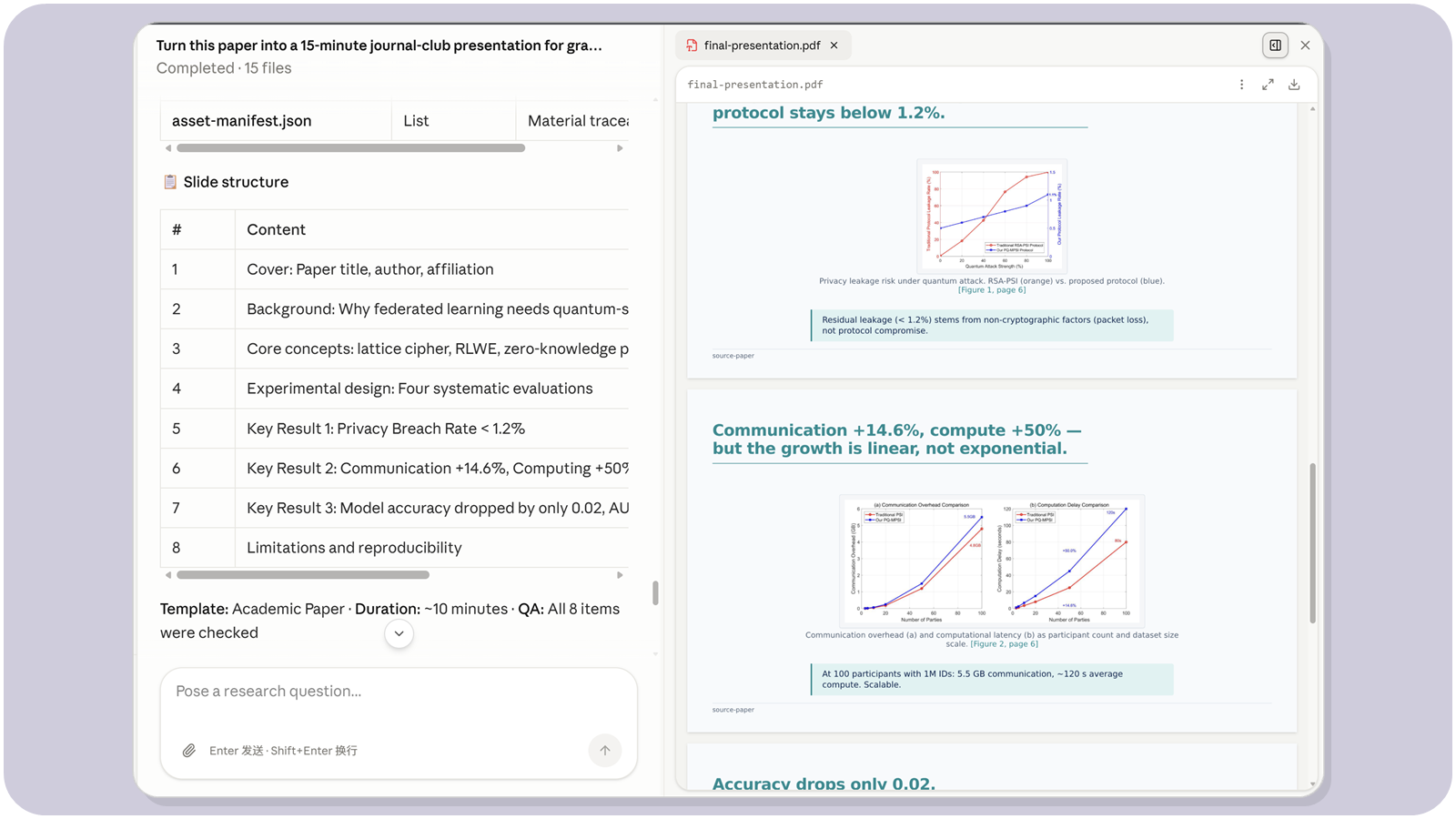
A strong research presentation does more than transfer paragraphs from a paper onto slides. It helps an audience understand, within a limited time, which problem the research addresses, why it matters, whether the method is credible, what evidence supports the claims, and where the conclusions stop.
Yila can read a paper, project materials, or an existing presentation brief, extract the research question, knowledge gap, methods, evidence, and limitations, then organize the story around the audience, speaking time, and slide count. You do not need to design every slide in advance. Prepare the source materials and explain who the talk is for, how long it will be, and what the audience should remember.
This guide covers the workflow in three steps. Template choice, slide count, image strategy, speaker notes, outline approval, revision, and export are addressed in the FAQ.
Estimated time: approximately 8-12 minutes, depending on source length, slide count, image processing, and revision rounds.
Quick Start in 3 Minutes
Step 1: Upload Materials and Describe the Audience
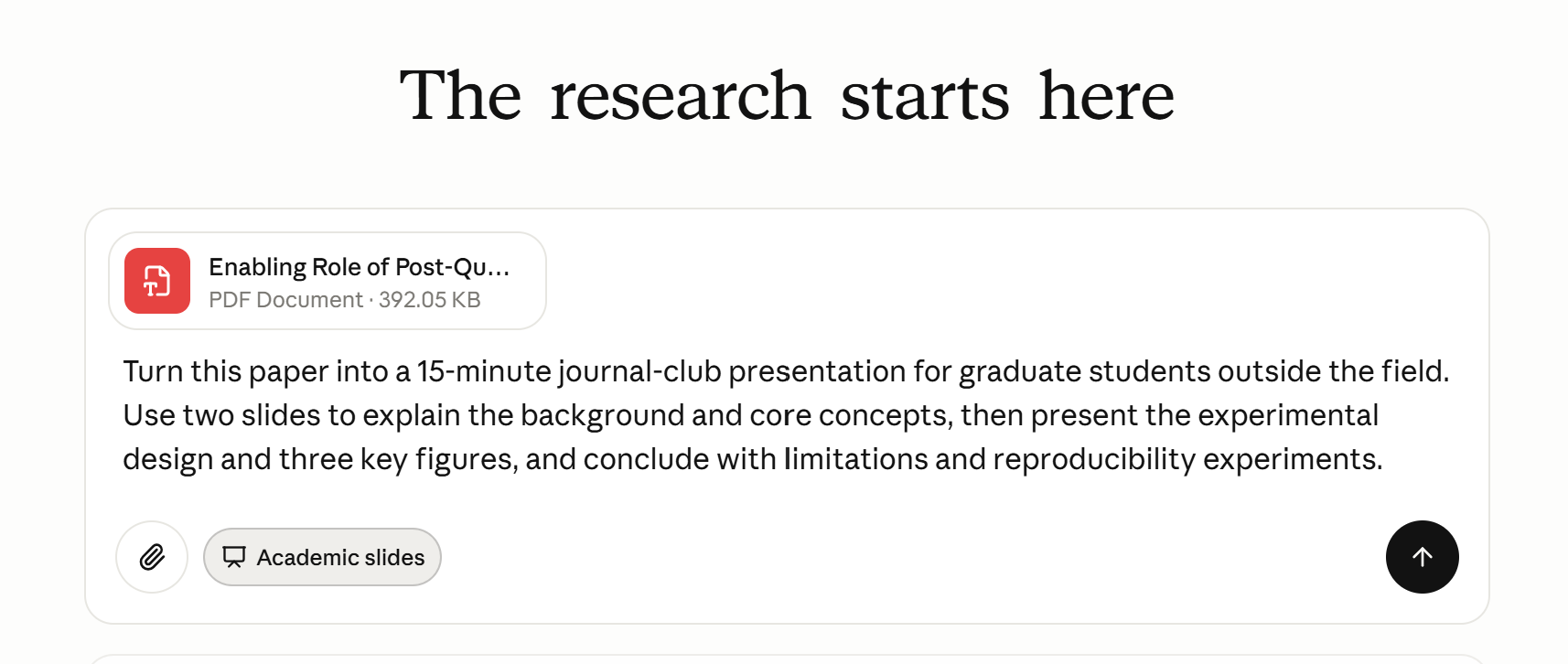
Open Research Presentation in Yila. Upload a paper PDF, project materials, or an existing deck, or begin from a research topic. Then provide three essential details:
-
Presentation setting: lab meeting, journal club, thesis defense, committee update, or general academic talk.
-
Audience: specialists in the field, interdisciplinary researchers, graduate students outside the field, or decision makers.
-
Primary takeaway: the central contribution, key results, method workflow, limitations, or next steps.
For example:
Turn this paper into a 15-minute journal-club presentation for graduate students outside the field. Use two slides to explain the background and core concepts, then present the experimental design and three key figures, and conclude with limitations and reproducibility experiments.
You do not need to provide every slide title. Once the audience and presentation goal are clear, Yila first develops a research story suitable for slides.
Step 2: Choose a Template and Presentation Settings
Select a template, audience, duration, slide count, output language, image strategy, and whether to include speaker notes.
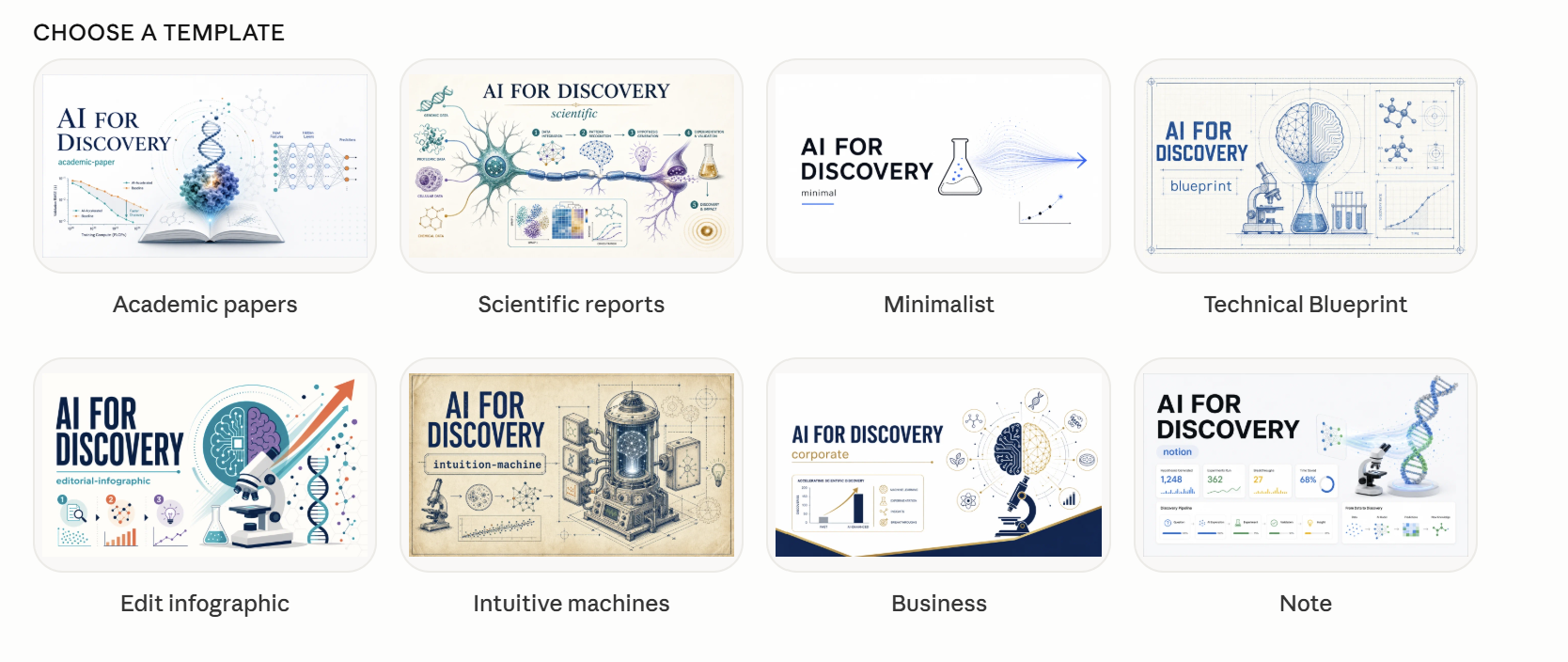
Available templates include:
-
Academic Paper: emphasizes the research question, methods, evidence, and conclusions.
-
Scientific Report: suitable for experiments, data, and technical results.
-
Minimal: generous whitespace focused on core ideas.
-
Technical Blueprint: suitable for system architectures, workflows, and technical solutions.
-
Editorial Infographic: organizes complex content through strong narrative and infographics.
-
Intuition Machine: uses conceptual models and visual analogies to aid understanding.
Choose 8, 12, 16, or 20 slides, or let Yila decide. Duration options include 10, 15, 20, or 30 minutes. Do not add excessive slides merely for completeness; prioritize whether each slide can be explained clearly during the actual talk.
Step 3: Approve the Outline, Review the Deck, and Download
Yila first generates a slide outline showing the section order, slide titles, source usage, and planned existing or newly generated visuals. Check whether the story flows:
-
Does the opening quickly explain the problem and its importance?
-
Are the methods explained at a level the audience can understand?
-
Are the results organized around a small number of key pieces of evidence?
-
Do the conclusions follow from the evidence?
-
Are limitations and next steps retained?
If satisfied, choose Approve Outline. Otherwise, choose Revise Outline. Revising the outline does not immediately generate the final slides.
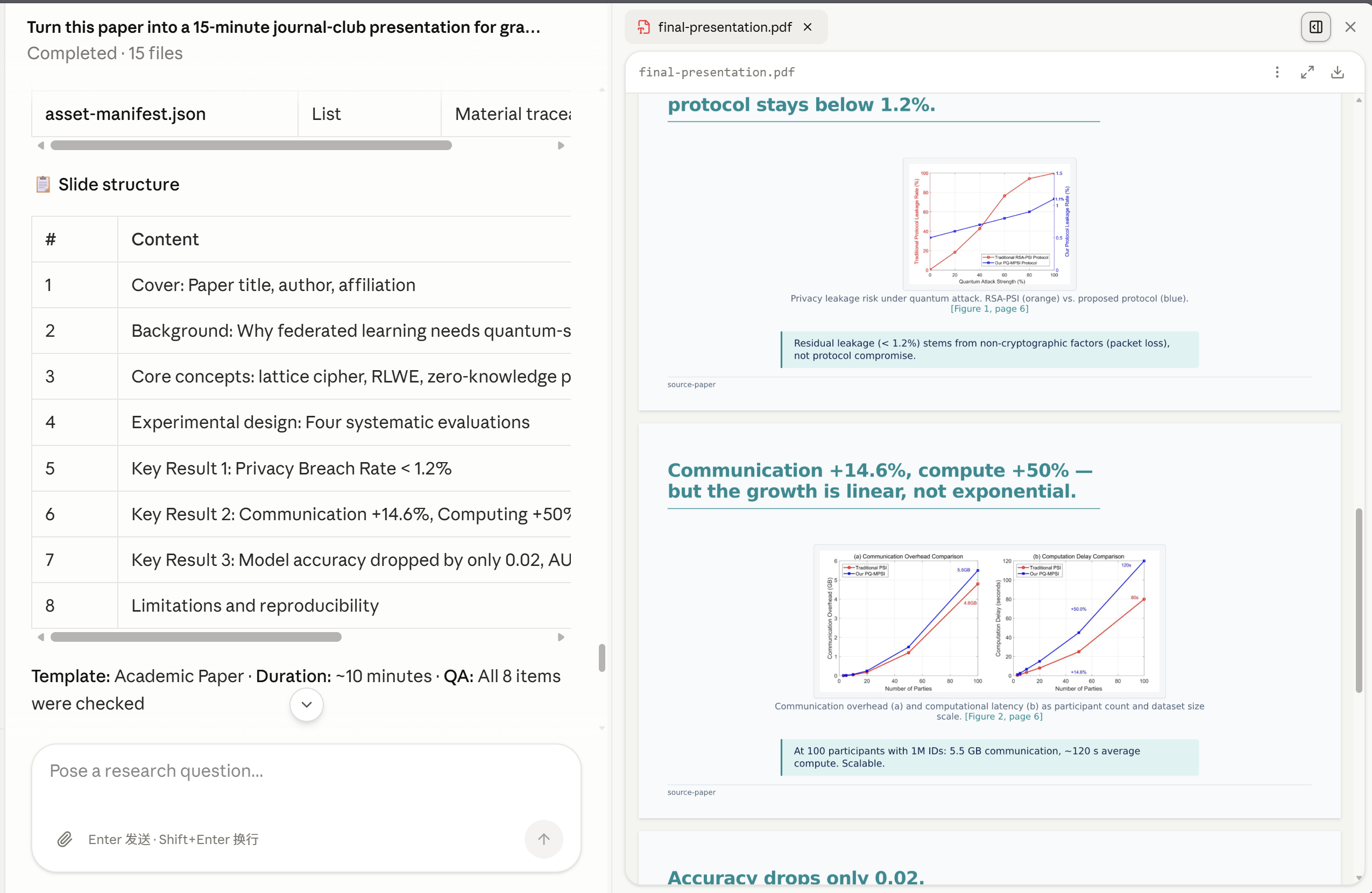
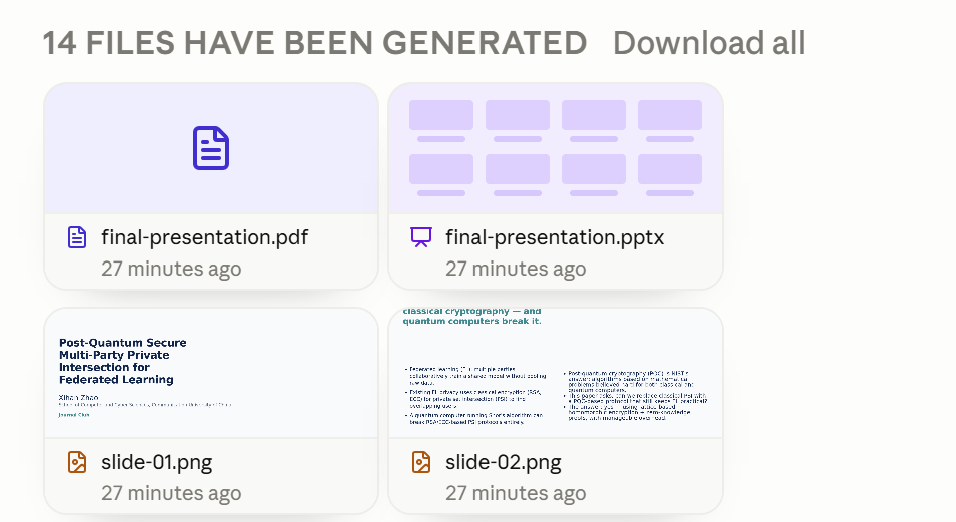
After generation, check that text and images are readable, citations and source labels are complete, and the PPTX and PDF are consistent. Core deliverables include:
-
final-presentation.pptx: an editable presentation.
-
final-presentation.pdf: a fixed-layout version for previewing and sharing.
-
presentation.json: the structured source specification.
-
QA report and asset manifest: layout checks and asset-source records.
How to Write Better Presentation Requests
1. Lab Meeting
State the speaking time, the lab's background, which method or result deserves discussion, and whether open questions should remain visible.
2. Journal Club
Ask Yila to explain the background first, then evaluate the experimental design, strength of evidence, limitations, and reproducibility instead of simply following the paper section by section.
3. Thesis Defense
Specify the defense duration, research narrative, personal contribution, innovations, and likely questions. Make sure every conclusion is linked to visible evidence.
4. Audience Outside the Field
Reduce terminology density, add background and conceptual diagrams, use intuitive analogies, and define abbreviations when they first appear.
5. Tell the Story Through Key Figures
Name the two to four figures that must be retained. Give each figure one clear message, reading guidance, and a source label.
6. Revise a Generated Presentation
Refer to slide numbers and state what to retain, remove, or rewrite, together with the reason. For example: "Reduce the method detail on slide 5 and emphasize the experimental comparison."
Core Advantages of Yila Research Presentations
-
Extracts a presentation-ready research narrative instead of copying source text.
-
Adjusts content depth and pacing for the audience, duration, and slide count.
-
Provides an outline before generation so the story can be reviewed and revised.
-
Supports multiple academic templates, image strategies, and speaker notes.
-
Delivers an editable PPTX, fixed-layout PDF, structured specification, and QA report.
Frequently Asked Questions and Additional Notes
1. Which materials can I start with?
You can use a paper PDF, project materials, an existing presentation, or a research topic. More complete source materials make it easier to reuse figures and preserve citations accurately.
2. How is a research presentation different from a regular presentation?
A research presentation gives more weight to the research question, methodological credibility, evidence chain, citations, limitations, and boundaries of the conclusions, rather than visual style alone.
3. How should I choose a template?
Choose according to the presentation setting and content structure. Scientific Report works well for experiment- and data-heavy talks, Technical Blueprint for workflows and systems, and Minimal or Intuition Machine for interdisciplinary explanation.
4. How should slide count match presentation duration?
Allow roughly one to two minutes per slide. Start around eight slides for a 10-minute talk and 12-16 slides for a 20-minute talk, leaving time for key figures and questions.
5. What does the audience setting affect?
It changes terminology explanations, the amount of background, method depth, and how results are framed. Specialists and audiences outside the field need different information density.
6. Why must I approve the outline before generation?
The outline defines section order, the purpose of each slide, source usage, and the visual plan. Reviewing it first reduces major restructuring after rendering.
7. What is the difference between Approve Outline and Revise Outline?
Approve Outline starts final generation. Revise Outline changes the structure and content plan without rendering the final deck.
8. How should I choose an image strategy?
Reuse original figures when research evidence must remain source-faithful. Generate supporting visuals when explaining a concept or workflow. Formal presentations should retain source labels.
9. Will every figure from the paper be used automatically?
No. Yila selects figures that serve the narrative instead of placing every chart mechanically into the deck.
10. Is text inside paper figures editable?
Text embedded in a raster image is usually not directly editable. Redraw the chart or add editable annotations in the PPTX when changes are necessary.
11. Can speaker notes be added?
Yes. Request speaker notes, a slide-by-slide script, time cues, or transition sentences in the initial instructions.
12. Can Yila create a bilingual presentation?
Yes. Specify the language for titles, body text, captions, and speaker notes, then verify that technical terminology remains consistent.
13. How are citations and image sources handled?
Yila attempts to preserve citations and asset sources. Before formal use, manually verify authors, years, DOI information, image permissions, and source labels.
14. How can I revise the presentation after generation?
Download and edit the PPTX, or continue in the original task with slide-specific requests to rewrite content, reorder sections, replace images, or adjust the language style.
15. What is the difference between PPTX and PDF?
PPTX is intended for continued editing and presenting. PDF is useful for previewing, sharing, printing, and fixed-layout review.
16. What is the QA report for?
The QA report records slide count, template consistency, source strategy, asset traceability, overflow checks, and PPTX structure so layout risks can be found quickly.
17. Can the deck be used directly for a formal defense or conference?
Review facts, numbers, figures, citations, terminology, layout, and speaking pace manually, then complete at least one full rehearsal before formal use.
18. How long does generation take?
Generation usually takes several minutes. The exact time depends on source length, slide count, image processing, newly generated visuals, and the number of revision rounds.
Summary
Creating a professional research presentation with Yila has three steps: upload the materials and describe the audience and goal, choose a template and presentation settings, then approve the outline, review the finished deck, and download the PPTX and PDF.
Define who the talk is for, how long it will be, and what the audience should remember. Use outline approval to control the research story before rendering, and you can produce a clear, traceable, and editable research presentation more efficiently.